

Work Desk
My Work Desk: every employee knows what to do, and does it from one window.
Each user opens TiVora to a personal desk built from live transactions: today's tasks, what is critical, what is waiting on them, and what is happening around them. Approvals, follow-ups, entries and calls are completed right there, with no hunting through menus.
The owner's morning.
The Work Desk, performance and dashboards, in a minute.
Read the video as text
- 0:01The owner's morning, on TiVora.
- 0:04Everything starts on Home. Your most used entries are one click away.
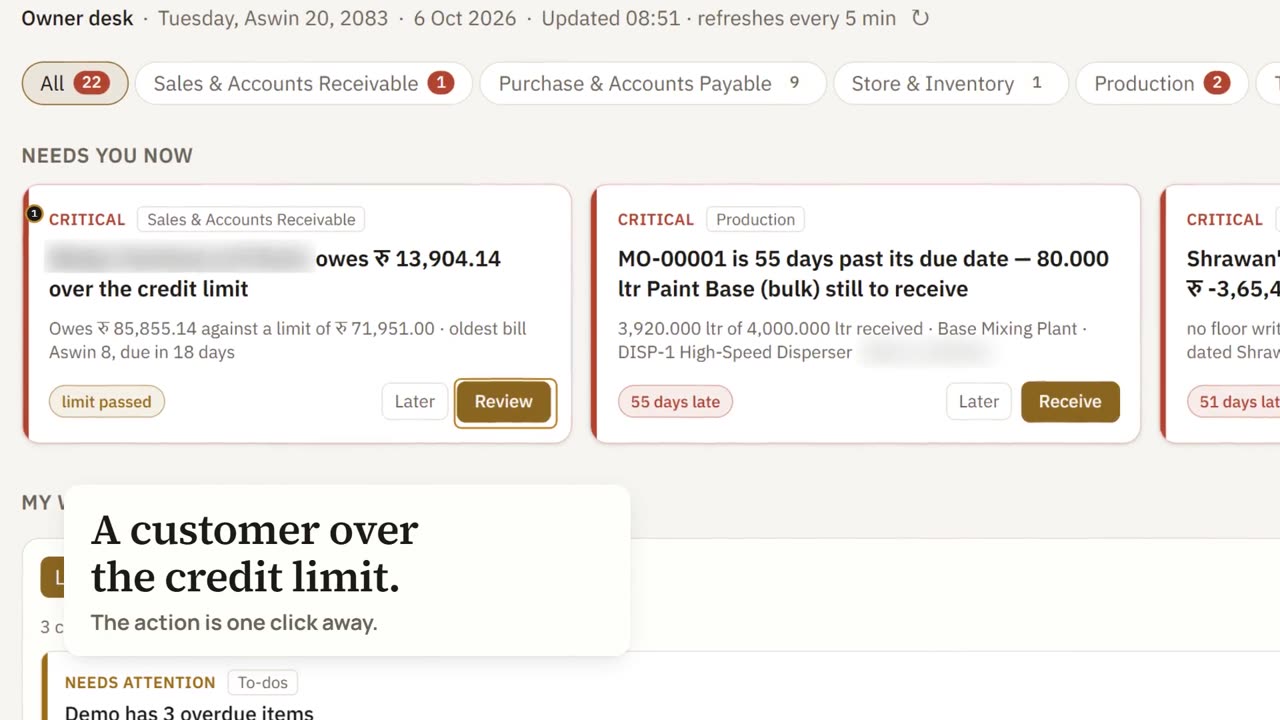
- 0:09The Work Desk is where the day begins. It gathers what needs you from every module, sorted by late, today, this week or snoozed. A customer is over the credit limit. A production order is weeks late. A journal has not been posted. Each one has its action beside it, so you fix it there.
- 0:32Then the numbers: who owes you, and whom you owe, in one view.
- 0:38Sales for the last thirty days. The VAT this month, output less input. And work assigned, done, on time or overdue.
- 0:46Every module has a dashboard of its own. Sales against the same days last month, a running total against target, and what customers owe.
- 0:58TiVora ERP. One platform. Every business.
What needs you now.
A customer over the credit limit, a manufacturing order past its date, a supplier payment coming up. Each item sits under the module it belongs to, with the button that deals with it.
- 1Credit approvalA customer's order goes for approval with the Decide button one click away.
- 2Over the credit limitA customer's open bills pass the limit set for them, with Review one click away.
- 3Order past its due dateA manufacturing order is days late, with Receive one click away.
The system reminds you what to do and stops what you should not do.
- Tasks generated from live transactions, not typed manually.
- Due follow-ups, collections, dispatches and approvals in one queue.
- Escalation to the manager when a task overruns.
- Sale beyond credit limit goes for approval.
- Price below minimum or margin below floor is flagged.
- Near-expiry batch is suggested first; spend beyond budget is blocked.
Needs you now
Critical items first, such as a credit approval or an order past its due date, then what is due today and this week, each with the button that deals with it.
TiVora reminds you
A prompt when a pattern needs action, such as customers who usually reorder and have not, with a one-click way to create the follow-up tasks for your team.
Around you
What is happening in other departments that touches your work: stock below reorder level, a loan headroom alert, a payment received.
A dashboard for every module.
Each dashboard opens on its trend, with your work, what is critical and what is outstanding a tab away. The Dashboards page lists the Executive dashboard first, then Sales, Customer Services, Purchase, Store, Production, Finance, Trade and Tax.
Executive dashboard
Run meetings on data, not on assumption.
The Executive Dashboard gives owners and department heads a 360° live view of the whole company. Every number drills down to the voucher behind it, so a review meeting moves straight from “what happened” to “what we do next”.
The result: managers talk only about business, performance, efficiency and scalability. No perception, no general talk. Every claim in the room has a number and a source entry behind it.
How a TiVora review meeting runs
- 1Open the dashboardNot a spreadsheet someone prepared last night.
- 2Start with exceptionsWhat is red, who owns it, by when.
- 3Review each person's KPIsAgainst target, live.
- 4Assign actionsThey land directly on each person's Work Desk.
The right KPI for every team member and every department.
Set the target once. TiVora tracks it live from real transactions and from every task on each person's Work Desk, so every score is earned in the system, not reported in a meeting.
KPI library by department
| Department | Measured automatically |
|---|---|
| Sales | Target vs achievement, new customers, quotation conversion, order value, visit compliance, collection efficiency |
| Purchase | On-time delivery by vendor, price variance, PO cycle time, vendor rating |
| Production | Plan adherence, output vs standard, wastage %, cost per unit, machine downtime |
| Store & Inventory | Inventory days, stock accuracy, near-expiry value, dead stock, dispatch turnaround |
| Finance | Receivable and payable days, cash position, budget vs actual, margin by product and customer |
| Customer Service | Complaints opened and closed, resolution time, repeat complaints |
See TiVora run your business, before you decide.
A live demo customised to your industry, with your products, your process and your reports.