

TiVora ERP
The ERP that tells you what’s next.
TiVora knows everything happening in your business, tells every person what to do next and why, and is customised for your industry and your way of working.
Read the video as text
- 0:00Does your team know what to do today, without asking you?
- 0:30Every company. Every branch. Live.
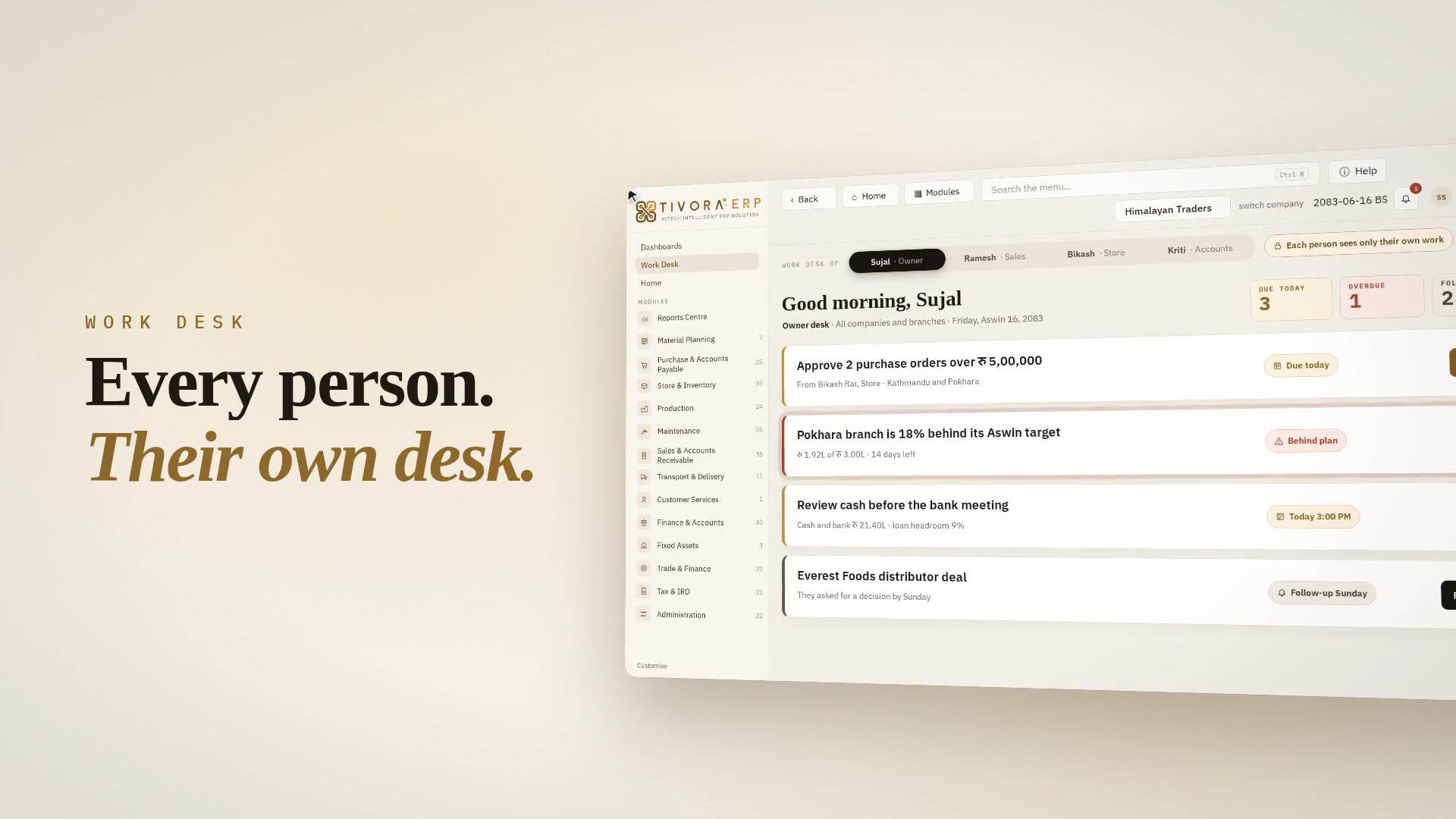
- 0:40Work Desk. Every person. Their own desk.
- 0:50One entry. Everything else follows.
- 1:10The same chain runs in purchase and production.
- 1:30Your business, anywhere. Open only to the right people.
- 1:40Plus solutions made for your industry.
- 1:48Zero re-typing. Mistakes stopped. Nothing forgotten. Live numbers.
- 1:52The next-generation ERP, by HiTech. 28+ years, 10,000+ clients, 15+ branches, 100+ professionals.
- 1:58TiVora ERP, HiTech Intelligent ERP Solution. The ERP that tells you what's next.
Developed by HiTech Solutions and Services Pvt. Ltd.
A platform with 26+ years of business software behind it.
- years
- 26+
- team members
- 100+
- support offices
- 20+
- countries
- 5+
- clients
- 10K+
Intelligent
It knows every open item in your business and acts like your manager: what to do, why it matters and what comes next.
Integrated
Every module on one database. Every entry updates stock, ledgers, dashboards and KPIs the moment it is saved.
Focused
Each person sees only what matters to their role, so attention goes to the work that moves your targets.
IRD certified
Connected to IRD, with every issued bill locked, so your billing stands up to the tax office.
One process. Every module.
From the plan to the report.
TiVora follows the way a business actually runs: plan first, then sell, buy, store, make, deliver, account and report, with every person’s Work Desk and the dashboards watching the whole chain.
Work Desk and Dashboards run across every stage: each person's tasks, critical items and approvals, and live executive and department views.
1 · Plan
Plan first.
Material Planning
2 · Sell
Then sell.
Sales & Receivable
3 · Buy and store
Buy and store.
Purchase & Payable, Store & Inventory
4 · Make and maintain
Make, and keep it running.
Production, Maintenance
5 · Deliver and serve
Deliver and serve.
Transport & Delivery, Customer Services
6 · Account
Account for all of it.
Finance & Accounts, Fixed Assets, Trade & Finance, Tax & IRD
7 · Know and control
Know it, and control it.
Reports Centre, Control Panel
Stage 1 of 7 · Plan
Sales forecast and confirmed orders run through the bill of materials, net of stock and open orders, to show what to buy, what to make and by when.
Stage 2 of 7 · Sell
Quotation, order, challan, invoice and receipt in one chain. The invoice posts sales, VAT and the receivable ledger, and the receipt updates customer ageing.
Stage 3 of 7 · Buy and store
Reorder, purchase order, goods received, bill, landed cost and payment. Stock is held at true cost, with every movement recorded.
Stage 4 of 7 · Make and maintain
Production order, material to the floor, receipt costed batch by batch, variance. Maintenance covers machines, vehicles, utilities, breakdowns and spares.
Stage 5 of 7 · Deliver and serve
Dispatch on your own vehicles or hired transporters, then savings schemes, repairs and the return dates that bring customers back.
Stage 6 of 7 · Account
Vouchers, books, cheques and final accounts; the asset register and depreciation; LCs, guarantees and foreign exchange; VAT, Annex 9 and 13, TDS and the IRD connection.
Stage 7 of 7 · Know and control
Every report you may open in one searchable list, and every setting in one place: users, workflow, settings and licence.
Underneath all of it
One database. Every module updates the moment an entry is saved.
Work Desk
My Work Desk: every employee knows what to do, and does it from one window.
Each user opens TiVora to a personal desk built from live transactions: today's tasks, what is critical, what is waiting on them, and what is happening around them. Approvals, follow-ups, entries and calls are completed right there, with no hunting through menus.
The system reminds you what to do
- Tasks generated from live transactions, not typed manually
- Due follow-ups, collections, dispatches and approvals in one queue
- Escalation to the manager when a task overruns
And stops what you should not do
- Sale beyond credit limit goes for approval
- Price below minimum or margin below floor is flagged
- Near-expiry batch is suggested first; spend beyond budget is blocked
Executive Dashboard
Run meetings on data, not on assumption.
The Executive Dashboard gives owners and department heads a 360° live view of the whole company. Every number drills down to the voucher behind it, so a review meeting moves straight from “what happened” to “what we do next”.
How a TiVora review meeting runs
- Open the dashboard, not a spreadsheet someone prepared last night
- Start with exceptions: what is red, who owns it, by when
- Review each person's KPIs against target, live
- Assign actions that land directly on each person's Work Desk
The result: managers talk only about business, performance, efficiency and scalability. Every claim in the room has a number and a source entry behind it.
Work Desk Performance
The right KPI for every team member and every department.
Set the target once. TiVora tracks it live from real transactions and from every task on each person's Work Desk, so every score is earned in the system, not reported in a meeting.
KPI library by department, measured automatically
- Sales
- Target vs achievement, new customers, quotation conversion, order value, visit compliance, collection efficiency
- Purchase
- On-time delivery by vendor, price variance, PO cycle time, vendor rating
- Production
- Plan adherence, output vs standard, wastage %, cost per unit, machine downtime
- Store & Inventory
- Inventory days, stock accuracy, near-expiry value, dead stock, dispatch turnaround
- Finance
- Receivable and payable days, cash position, budget vs actual, margin by product and customer
- Customer Service
- Complaints opened and closed, resolution time, repeat complaints
Single entry
One entry. Everything else follows.
Each document is created from the one before it, so data is never retyped. Stock, ledgers, tax, receivables and dashboards update the moment a step is saved.
- 1
Quotation
Your team does
Customer, items and price list
TiVora does automatically
Applies price list, schemes and VAT; sends it by email or WhatsApp
- 2
Sales order
Your team does
One click from the quotation
TiVora does automatically
Checks credit limit, floor rate and stock; holds for approval if a rule is crossed
- 3
Challan
Your team does
Delivery note from the order
TiVora does automatically
Reduces stock, picks batch by expiry, assigns own vehicle or transporter
- 4
Invoice
Your team does
Tax invoice from the challan
TiVora does automatically
Posts sales, VAT and receivable ledgers, connects to IRD, locks the issued bill
- 5
Send to customer
Your team does
From the same screen
TiVora does automatically
Invoice PDF reaches the customer's email and WhatsApp in minutes
- 6
Receipt
Your team does
Payment set against bills
TiVora does automatically
Updates customer ageing, salesperson target and cash position
Result
Dashboard, P&L, stock and KPI reports are correct the moment the last step is saved.
Re-typed fields: 0
The same single-entry chain runs in purchase
Reorder → purchase order → goods received → bill → landed cost → payment. Stock at true cost, LC margin and payables post on their own.
And in production
Plan → production order → material to the floor → receipt costed batch by batch → variance. WIP and finished goods move with each step.
Approvals
Control. Every rule, every time.
Set your company’s rules once. TiVora decides which documents need approval, sends them to the right person, reminds and escalates, and posts the transaction the moment it is approved.
Document saved
PO, sales order, payment, discount, journal
Rule engine checks
amount, discount %, credit limit, margin, budget, user role
Within limits: no approval needed
Rule crossed
- Level 1Branch manager, up to Rs 5 L
- Level 2General manager, up to Rs 25 L
- Level 3Director, above Rs 25 L
Auto-escalation. No action in 4 hours: reminder, then next level. Rejected: back to the maker with a comment.
Posted automatically
stock, ledgers and KPIs update, the maker is notified, the full audit trail is saved
Approval levels and limits shown are an example; each company sets its own.
Mistakes stopped before they happen
- Rate below floor?Needs approval.
- Discount above limit?Needs approval.
- Issued IRD bill?Locked forever.
- Approval PIN and multi-factor login for every approver
- Full context on the approval: bill, limit, overdue
- Audit trail for the owner: who created, who approved, when
- Approve from the Work Desk wherever you are
Material Planning
Material Planning and MRP workbench: buy and make exactly what you need.
The MRP workbench combines your sales forecast and confirmed orders, explodes them through the bill of materials, nets off stock and open orders, and tells you what to buy, what to make and by when.
- Sales forecast from history, season and targets
- Production plan by plant, line and shift
- Reorder policy per product group
- Purchase requests and work orders created from the workbench
- Imported items scheduled with LC and shipping lead time
- Plan vs actual tracked daily on the dashboard
- 1Forecast + confirmed orders
- 2BOM explosion
- 3Net of stock and open POs
- 4Lead-time scheduling
- 5Purchase and work orders
Production costing
Planned cost vs actual cost, visible every day, not at year end.
Every batch is costed against its standard as it is received. Variance, yield, loss and machine efficiency are visible the same day, so cost leaks are fixed while they are still small.
- Plan: standard cost from the BOM and the production plan, before a single batch starts.
- Compare: actual against standard for every batch, product and stage, the day it is received.
- Correct: imports too, landed cost estimate against actual for every charge on every shipment.
Ready for Nepal: tax, trade, finance and import costing.
Built in Kathmandu for the way Nepali businesses actually operate.
VAT on every line
Annex 9Annex 13VAT reportsTDS and income tax
Deducted and reported where it applies.
IRD certified
Connected to IRD; issued bills are locked forever.
Bikram Sambat and AD
And the Nepali fiscal year.
BS 2083AD 2026Trade and finance
Letters of creditMargin heldTrust receiptShort-term loansBank limitsBank guaranteesForeign-currency settlementLanded cost, estimate against actual
FreightDutyClearingBank chargesItem cost
One entry. Every module. One ledger underneath.
Complete modules, one database. Every module talks to every other.
Work Desk
Every person's tasks, critical items and approvals
Dashboards
Executive and department views, live
Sales & Receivable
Counter billing, orders, receipts, what customers owe
Purchase & Payable
Orders, bills, returns, imports and paying for it
Store & Inventory
Items, rates, where stock is, every movement
Material Planning
Reorder policy, sales forecast, purchase plan
Production
BOM, orders, floor, batch costing, variance
Maintenance
Machines, vehicles, utilities, breakdowns, spares
Transport & Delivery
Dispatch, own vehicles, hired transporters
Customer Services
Savings schemes, repairs, return dates
Finance & Accounts
Vouchers, books, cheques, final accounts
Fixed Assets
Register, depreciation, disposals
Trade & Finance
LC, trust receipts, guarantees, FX
LCs, bank guarantees, foreign-currency revaluation.
Tax & IRD
VAT, Annex 9 and 13, TDS, IRD
Reports Centre
136 reports, one searchable list
Control Panel
Users, workflow, settings, licence
Launching soon
- CRMLeads, follow-ups, pipeline, customer history
- ExportsExport orders, proforma, packing list, shipping documents
- Quality ControlInspection, test results, hold and release of batches
- HRMEmployees, attendance, leave and payroll
Engines that run underneath every module
- Approval & authorisation
- Multi-level, value- and role-based approvals with escalation
- Workflow
- Configurable document flows, reminders and task generation
- Promotion
- Schemes, slabs, free goods and discounts applied at billing
- Tax & VAT
- Correct tax on every line, document and return
- Import & landed cost
- Freight, duty, clearing and bank charges allocated to item cost
- Batch, expiry & serial
- Batch-wise and serial-wise tracking, first-expiry-first-out dispatch
- Security & MFA
- Multi-factor login, approval PIN, role rights and full audit trail
- Communication
- Quotations, invoices and statements by email, WhatsApp and SMS from the document
Customised for your industry. Configured for your company.
We don’t ask you to fit a generic ERP. We start from a complete platform, add the solution made for your industry, then customise it to your products, your approvals and your reports.
- JewelleryMetal and stone tracking, purity, making charges, old gold, karigar management
- Paint & CoatingsShades and tinting, dealer schemes, volume pricing, batch control
- FMCGDistributor and retailer chain, schemes and promotions, route and beat
- PharmacyBatch and expiry, first expiry first out, near-expiry returns
- AutomobileChassis and engine tracking, workshop job cards, spares, warranty and service
- TradingImports, landed cost, LC and trust receipts, credit control
- ManufacturingBOM, production orders, WIP, yield, variance, machine efficiency
TiVora ERP is the new platform from HiTech Solutions and Services, who have built business software in Nepal for 26+ years.
About HiTechSee TiVora run your business, before you decide.
A live demo customised to your industry, with your products, your process and your reports. We’ll show your Work Desk, your dashboard and your approvals working on the call.